|
iungo.org
»
Tutorial
»
Step 5
|
Step 5
Customize language, colors and layout of the iungo-desktop
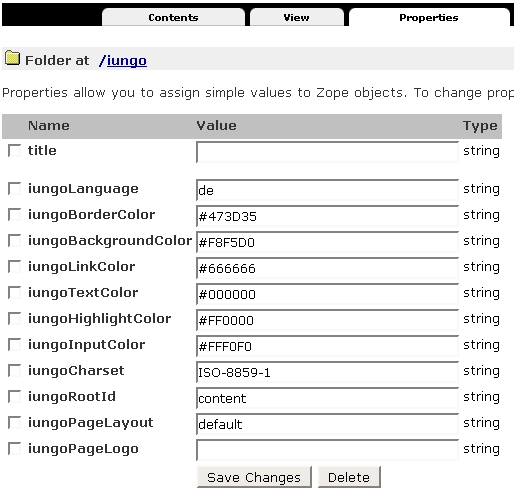
- Most of the properties should be self-explaining (just change them and
see what happens). Sometimes (esp. for changing the language) you'll need
to close / reopen your browser to make changes really work, because iungo
stores some properties in the user-session.
- iungoLanguage: Up to now there are two translations for the
iungo-Desktop. German (de) and English (en). If you want to create your own
version (please share it with me!), you need to enter
/iungo/iungo/translations in the ZMI and copy/paste and change an
already existing translation. Its really easy to do. After you've done the
changes and changed the iungoLanguage you'll need to close / reopen the
browser, because iungo stores translations for the desktop in the
user-session for speed-up.
- iungo*Color: Just try and see what happens. It's easy to guess,
too...;)
- iungoCharset: If you'll need another character-encoding for your
site, you can change this here. PLEASE NOTE: You should change the
character-encoding before you'll create the first content, afterwards
you'll need encoding-migration scripts to make things work properly.
- iungoRootId: This is the id of the iungo-repository where all
content should be stored. This needs only changes if you don't use a
Virtual-Hosting-Environment to hide the Id of the root-folder.
- iungoPageLayout: If you want to display the navigation at the
left-side, simply change the value to something else. Currently only
default = navigation-tree at the right is supported. This may change in
future releases.
- iungoPageLogo: If you want to replace the nice iungo-Logo in the
upper-left with something of your own, please enter the URL to the image
here.
- iungoExternalEditor: Uncheck this if you don't want to see or
use the button "External Edit".
- iungoDirectoryListing: Uncheck if you don't want the default
directory-listing below each page when using the iungoDesktop.
- iungoContentHistory: Uncheck if you don't want show the
selection for historical document revisions.
|
|
|